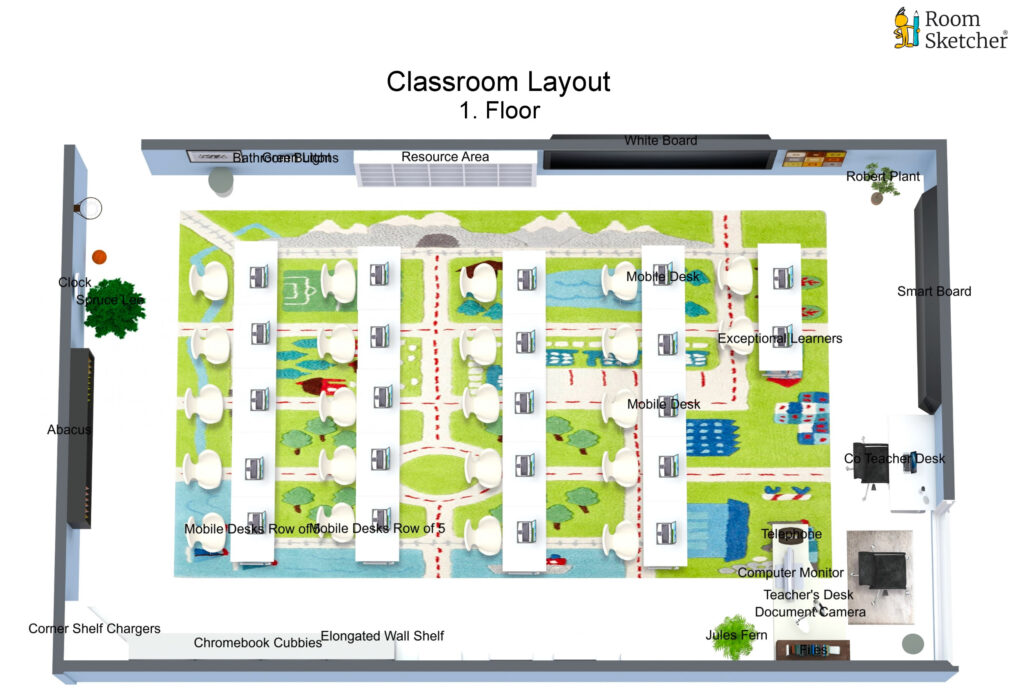
Lets Take a tour of your new classroom
A common layout for a math classroom is a combination of individual desks and group tables. Desks are equipped with wheels for easy manipulation during group activities. We periodically arranged group tables, placed strategically throughout the classroom, to allow for collaborative activities and discussions among students. When grouping desks, they are arranged in a way that promotes collaboration and engagement. This setup encourages peer learning, problem-solving, and communication skills development, all of which are important in math education.
Classroom Layout
7th Grade Math
1. Teacher and Co-teacher Desks:
The teacher’s desk is placed at the front of the classroom, facing the students. This positioning allows the teacher to have a clear view of all students and facilitates effective communication and monitoring of students while performing administrative tasks.
A document camera, positioned next to the teacher’s computer monitor, serves multiple purposes in supporting teaching and learning. The camera enhances guided notetaking by displaying documents and work sheets for the whole class to see, fostering student understanding and engagement. It also presents answer keys, allowing the teacher to demonstrate problem-solving techniques effectively. The document camera’s recording capability enables the creation of instructional videos shared on Google Classroom for independent learning and review. By facing the students during presentations, the teacher actively assesses their engagement and understanding, making necessary adjustments in real-time. The document camera promotes effective instruction, engages students, and supports independent learning and formative assessment.
Co-Teacher’s Desk: I seldom sit at my desk except for administrative tasks during breaks between periods. Instead, my desk serves as a designated area for students who may be disruptive or distracting their classmates. Placing my desk adjacent to the teacher’s desk allows for confidential discussions between myself and the teacher when reviewing students’ work without the entire class overhearing our conversation.
Many of our learning platforms, such as IXL, provide me with the capability to assess students in real-time directly from my desktop computer. This feature allows me to monitor student engagement during activities and identify those who may need assistance on specific questions when they answer them incorrectly. By leveraging these learning platforms, I can gather valuable insights into student progress and adjust my instruction accordingly to better support their learning needs.
2. Instructional Area:
The instructional area, which includes the smart board, is adjacent to the teacher’s desk. This arrangement enables the teacher to present mathematical concepts, write examples, and demonstrate problem-solving techniques conveniently.
A white board is positioned on the left exterior wall. This placement ensures easy visibility and accessibility for both the teacher and the students. The smart board and white board serve multiple purposes.
Firstly, the learning objective for each lesson can be prominently displayed to the class. This helps students understand the specific goal they are working towards during the class. By having a clear objective, students can focus their attention and efforts accordingly.
Additionally, daily activities and important instructions related to the lesson are written on the whiteboard. This allows students to refer to the board throughout the class and stay informed about the tasks and activities they need to complete. Writing the activities helps students stay organized and provides a visual reminder of the lesson structure. Relevant Google Classroom codes are written on the whiteboard when applicable. This enables students to access the respective Google Classroom quickly and easily. By displaying the codes, students can log in to the correct class, access assignments, and engage in online activities seamlessly.
Links to learning management systems, such as IXL or Quizlet, can be written on the whiteboard as well. This ensures that students have easy access to these resources and directions to navigate to them effortlessly when needed. By providing direct links, the students efficiently utilize these platforms for additional practice, and interactive quizzes.
In the event of a substitute teacher, the daily objective and links assist the substitute in classroom management and allow the students to be self-sufficient in your absence.
3. Student Desks:
A common layout for a math classroom is a combination of individual desks and group tables. Desks are equipped with wheels for easy manipulation during group activities. We periodically arranged group tables, placed strategically throughout the classroom, to allow for collaborative activities and discussions among students. When grouping desks, they are arranged in a way that promotes collaboration and engagement. This setup encourages peer learning, problem-solving, and communication skills development, all of which are important in math education.
However, after assessing classroom management mid-semester, my co-teacher and I found that aligning the desks in rows proved to be more effective. In my digital design, two individual desks are positioned in the front of the classroom, providing students with specific learning disabilities, the personal space they need while minimizing distractions. With a crowded classroom of 22 students, navigating between groups became challenging and posed safety hazards. As a result, I position myself along the right exterior walls to monitor students during direct instruction. This positioning allows me to easily walk the rows and provide individual attention when needed.
4. Wall Space:
Utilizing wall space effectively is crucial for reinforcing math concepts and providing visual aids. You’ll find two buttons resembling light switches, one green and one red, adjacent to the door. These buttons are pressed when students exit and return from using the bathroom. A class contract written collectively by the students, is displayed on the left exterior wall as you enter the classroom. The walls display posters or charts that highlight important formulas, mathematical rules, and problem-solving strategies. This serves as a constant reminder for students and supports their learning throughout the year.
5. Resource Area:
A designated resource area is located along the left exterior wall before the whiteboard. This area can consist of shelves and bins that hold manipulatives, calculators, rulers, protractors, scrap paper, pencils, and other necessary tools. The first bin has copies of the STARR formula chart, the weekly syllabus, and answer keys to previous assignments. Having resources easily accessible ensures students can retrieve them independently when needed. The resource area is organized and labeled appropriately, allowing students to locate materials efficiently, reinforcing their organizational skills.
6. Technology Integration:
Incorporating technology into the classroom layout is increasingly important in modern education. A corner shelf for charging Chromebooks or tablets is in the far corner of the right exterior and posterior wall on top of the elongated wall shelf. As you can imagine, 7th graders perpetually forget to charge their Chromebooks. If the use of Chromebooks is not needed during direct instruction or group work, students can charge their Chromebooks until they are ready to use them. At the beginning of class, I ask students to check if their Chromebooks are charged. If their battery levels are low, students can plug in their Chromebooks into outlets along the right exterior wall and use the wall shelf as a workstation while they charge.
To provide context, the wall shelf is waste high, stretching the length of the right exterior wall with ample number of outlets. This area provides additional space that facilitates supervision and interaction with technology while minimizing distractions. Integrating technology into math lessons enables students to explore math concepts interactively, enhancing their understanding through visualizations and simulations. The smart board and desk camera are grouped under this category.
- Smart Board: A Smart Board is an interactive whiteboard that allows the teacher and students to interact with digital content using touch, gestures, and digital pens. It offers various capabilities, such as writing and drawing directly on the board, annotating over images or diagrams, accessing educational apps, and displaying multimedia content. The Smart Board enhances student engagement, interactivity, and visual representation of mathematical concepts.
- Document Camera: The document camera, as mentioned previously, plays a crucial role in the classroom. It allows the teacher to project documents, worksheets, and related materials to the whiteboard, making them easily visible for the entire class. This visual aid supports guided notetaking, presenting answer keys, and demonstrating problem-solving processes.
- HPISD provided Chromebooks: The availability of Chromebooks for all students enables seamless integration of technology into the learning process. Chromebooks offer restricted web browsing capabilities, access to school resources, and compatibility with various educational applications. They allow students to complete digital assignments, conduct research, collaborate on projects, and engage with online learning platforms.
- Google Classroom: Google Classroom is a powerful learning management system that facilitates communication, collaboration, and assignment management between teachers and students. It provides a centralized platform for posting announcements, sharing resources, distributing and collecting assignments, and engaging in class discussions. Google Classroom streamlines the workflow, promotes organization, and enhances the digital learning experience.
- Learning Platforms: Various online learning platforms, such as IXL, Prodigy, Moby Max, and Quizlet, offer interactive activities, practice exercises, assessments, and educational games specifically designed to reinforce math concepts. These platforms provide personalized learning experiences, adaptive feedback, progress tracking, and additional practice opportunities for students.
- My Lenovo Laptop: The Lenovo laptop, which can transform into a tablet, serves as a versatile tool as an ICS teacher. With this device, I can access Google Drive, where answer keys, completed notes for the day, and previous lessons are stored. I can easily access class grades through an application called Skyward, take attendance. This tool has been a tremendous help in remembering students’ names, as I am admittedly terrible with names 😉. I regularly transition between 7th and 8th grade math and science classrooms. It’s worth noting that each teacher has their own unique adaptations to lesson plans and assessments. Shared drives for each class are accessible on my laptop. The laptop provides flexibility and convenience for instructional preparation, organization, and easy access to HPISD applications.
By utilizing these technology tools and platforms, my 7th-grade math classroom benefits from interactive and engaging instruction, personalized learning experiences, efficient management of assignments, and easy access to digital resources. The integration of these technologies enhances student learning, collaboration, and problem-solving skills in the digital age.
7. Safety Considerations:
Safety is a crucial aspect of any classroom layout. Clear pathways are maintained to ensure easy movement and evacuation during emergencies. Rows of desks are evenly spaced for the students to form single file lines and wait for dismissal or evacuation in the case of an emergency. Furniture is arranged to allow for unobstructed access to exits and emergency equipment.
As previously mentioned, in a small classroom of 22 students, I am constantly tripping over backpacks and wedging between groupings of 4, to attend to a student with a question on the far side of the room. By aligning my classroom with evenly spaced rows the flow of traffic is dramatically improved. Additionally, any potential hazards, such as cords or sharp edges, are properly managed and secured in accordance with safety standards. I intentionally placed the Chromebook charging station in the far corner of the room to avoid being obstructed by cords.
By carefully considering these factors, the layout of a 7th-grade math classroom can support effective instruction, foster student engagement and collaboration, and provide a safe and efficient learning environment. The connections between the layout decisions and the content are evident in the emphasis on visual aids, collaborative spaces, access to resources, integration of technology, and overall safety considerations.
Both students and teachers undergo comprehensive training on classroom safety protocols to ensure a secure and safe learning environment. This training equips them with the necessary knowledge and skills to effectively respond to emergency situations and implement preventive measures. By prioritizing safety, the classroom becomes a space where students can focus on their learning with confidence and teachers can facilitate instruction without compromising their well-being.
8. Three plants welcome the space. Spruce Lee, Jules Fern, and Robert Plant.